
The Epstein Redactions - They should have used Laserfiche
The news is out today (Dec. 24, 2025) that the redactions on the Epstein files can be “read” by simply selecting the text with Control-A, and then pasting the contents into Word or any other text editor. While hilarious, my reaction is simply, “They should have used Laserfiche”.
Here is why:
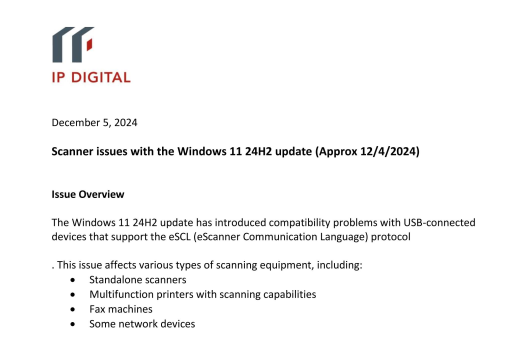
The Epstein files are actually scanned images stored as a PDF file. Redactions for this format need to be handled in a different manner than a true (created within Adobe products) PDF. Here is a scanned page we stored as a PDF:
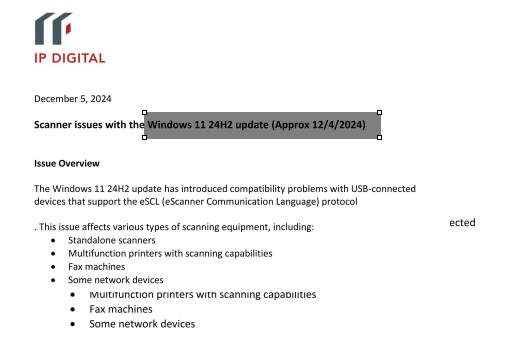
Next, we will add a redaction:
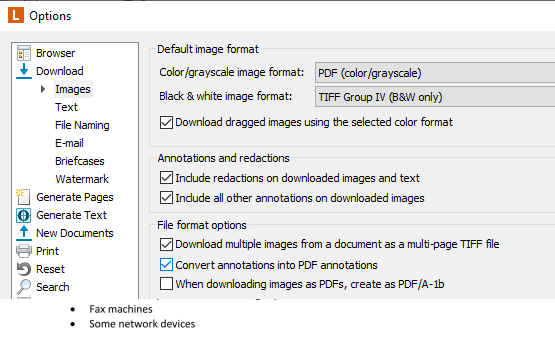
Here is the Export Options dialog box. Note the last checked item, “Convert annotations into PDF annotations”. This will turn the redaction into a permanent annotation which blocks the text underneath under all circumstances:
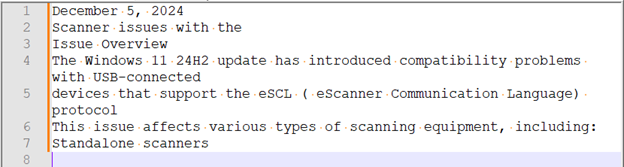
As Shakespeare wrote, “The proof of the pudding is in the eating”. Here we exported the contents, and then selected all of the text using Control-A. Note how the text is highlit in blue:
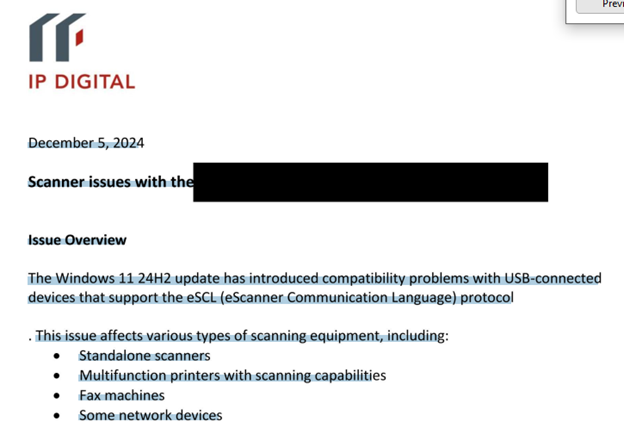
However, when we paste it into Word, the redacted text is missing. The text skips to “Issues Overview”, while “Windows 11 24H2 update (Approx 12/4/2024)” is blocked.
In fairness to the people working under great time pressure, this is complicated stuff. And the problem is made worse when you don’t have the right tools. Fortunately, Laserfiche IS the right tool, for this task and so many others.
With this post, I will hereby volunteer to head to the DOJ and show them how Laserfiche would have saved them lots of time and trouble, not to mention the other nifty automation tools it has!